7th of May, 2023
Main Pages Afterweb
Members


Removing Internet Explorer from Windows 98
In order to beat out Netscape, Microsoft integrated Internet Explorer into the shell for Windows 98 and it was pretty heavy on the systems of the era. While Windows 95 can run smoothly on a 486, Windows 98 requires a faster Pentium for a good user experience at the very least. In this guide, i'll show you what files you need to modify to completely eliminate IE from Windows 98! You might be wondering as to why anyone would do this, especially nowadays, but even a small performance boost can make file browsing much less tedious.

Asides from taking a load off your CPU, it will also free quite a bit of RAM memory as IE won't be running in the background all the time. You can also free around 40MB of valuable disk space! But all of this does come with some major costs. Since you do have to replace some core system files, a couple of default programs will break slightly. Not to mention, some third-party programs might break after you've done this like Daemon Tools. Now that i've told you all of that, let's get on with it shall we?
Bringing back the Windows 95 shell
It is fairly simple to restore the old shell, but it will require copying over a few system files from Windows 95. First, copy over these system files from Windows 95. You can put them anywhere, as we will need them for later.
| Directories | Files |
| C:\Windows\System | shell32.dll, comdlg32.dll |
| C:\Windows | explorer.exe |
Now, we will need to replace the Windows 98 versions of these files with the ones you've copied. Obviously, you will need to reboot into MS-DOS mode in order to replace these files without the explorer interfering. If you want to, feel free to make a backup before replacing anything. Now that you've replaced these system files, just type exit and once you log in you should have the Windows 95 shell!
There are a couple of cosmetic problems though. By default, the start menu banner will still say "Windows 95" because the banners are within the explorer executable itself. You can use a program such as Resource Hacker to replace the Windows 95 banner with another bitmap, just make sure to extend your banner vertically if the background color is different. Otherwise, after the banner graphic ends the background will be gray. Here is my customized Windows 98 with the old shell!
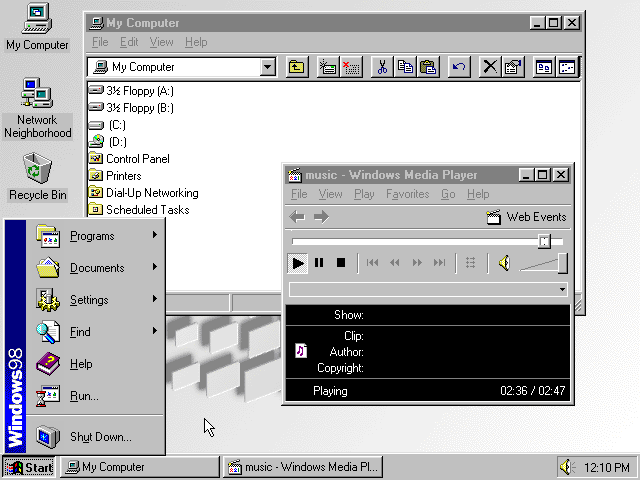
But like i said a while ago, a couple of programs will break. This includes Windows ones, too! First off, the welcome window will now start up regardless of your preference. I simply just deleted WELCOME.EXE from the "C:\Windows" folder. Next, Notepad and Wordpad will also stop working. You can just copy over the versions from Windows 95, it's not like you are losing valuable functionality. And also, Internet Explorer might not work anymore. I've updated IE to version 5.5, but should it stop working you can restore the original files to get it up and running again. You can just install another browser though! If that's the case, and if you want to remove IE and all of it's associated files, then just read on!
Removing Internet Explorer
First, go to "C:\Windows" and delete these folders:
- Catroot
- Cookies
- Downloaded Program Files
- History
- Java
- Temporary Internet Files
- Web
After you've done that, navigate to the "C:\Windows\Application Data\Microsoft" folder and remove the folders "Internet Explorer" and "Welcome". From the "C:\Program Files" folder, delete "Internet Explorer" and "Uninstall Information". Now, you'll need to open the find utility to search for all of the "Desktop.ini" files. You will need to delete all of them. Before closing the find utility, search for files ending with the .htt extension and remove them.
If you are the only user, you can safely delete the "C:\Windows\All Users" directory. Lastly, you will need to reboot to MS-DOS mode and remove the "C:\Windows\Favourites" folder. Yeah that's right, you need to reboot into MS-DOS mode just to remove this one folder.
And that is all you have to do! Altough you could probably use the 98lite trial version instead of doing this, i hope you found this article at least somewhat interesting. To ease the wait for new articles (because i am rewriting all of them currently), the next article i publish will be a brand new one! It will showcase the explorer shell from NT4 running on Windows 2000 and XP which, as far as i know, hasn't really been showcased anywhere on youtube.
Comments
Copyright ©2022-2023 UserPenalties